Manual Getting started
Stitch terms: density, pull compensation and underlay
Three ideas that decide whether a design looks crisp or messy, with a picture of each.
Three ideas explain most of the settings in Lilo.
Density#
Density is how close the stitches sit to each other. Closer stitches cover the cloth better. Too close, and the needle punches so many holes that the cloth tears or the thread snaps.
Lilo measures density as a gap in millimetres. Smaller gap means denser. For satin columns with 40 wt thread, 0.40 mm is the usual starting point. Read Satin tips.
Pull compensation#
Thread pulls cloth inward as it tightens. A stitched circle ends up a little smaller and narrower than you drew it. Pull compensation makes each shape a little bigger on purpose, so it ends up the right size after the pull.
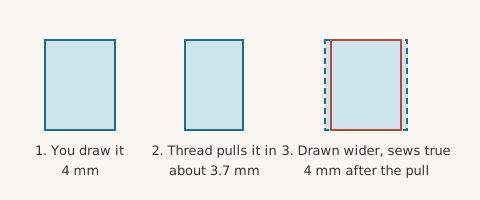
Stretchy cloth pulls more, so it needs more compensation. Lilo's Sewing setup adds extra for knits. Read Underlay and pull compensation.
Underlay#
Underlay is a layer of light stitches sewn first, under the pretty stitches. It does two jobs. It holds the cloth to the stabiliser. And it gives the top stitches something to sit on, so they look raised and even.
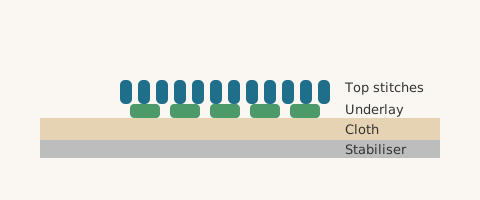
You will not see underlay in a good sew-out. You will notice when it is missing: the design looks flat and thin and the cloth shows through.
Satin and fill#
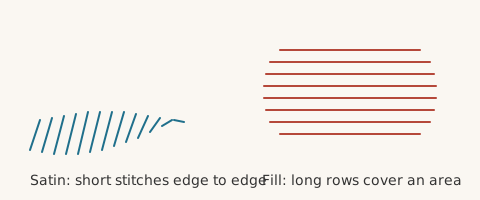
Lilo uses two main stitch types for areas.
- Satin is a column of side-to-side stitches. It looks shiny and smooth. It suits letters and borders from about 1.5 to 8 mm wide.
- Fill is rows of stitches that cover a large area. It suits big shapes.